
LAX FlyAway: Designing for travel confidence
Timeline
8 weeks
Role
UX Researcher & Product Designer
Scope of Work
Problem
When the service stopped communicating, workers became the information system
In 15 minutes at Union Station, I counted more than 10 travelers asking workers where to go, when the bus would come, or when boarding would start. Signs, schedules, and staff were all there, but nothing confirmed the next step.

Problem statement
How might we help FlyAway travelers at Union Station stay oriented from arrival to boarding, without asking a worker for every answer?
Solution
Designing the answer before travelers had to ask
Travelers needed confirmation at four moments in the trip, so the app is built around those.
Arrive with a clear next step
When travelers arrive at Union Station, the app points them to the FlyAway boarding area using landmarks they can see, which is easier to follow than signs or a map.
Wait with confidence
The app shows where the bus is, how long the wait is, and which bay to use, so travelers don’t have to read the crowd.
Prepare before boarding
As the bus gets close, travelers get a boarding alert and reminders to have their ticket, payment, and luggage ready.
Board with confirmation
Tickets and luggage details stay easy to reach, so travelers know what to show and where their bags are going before they board.
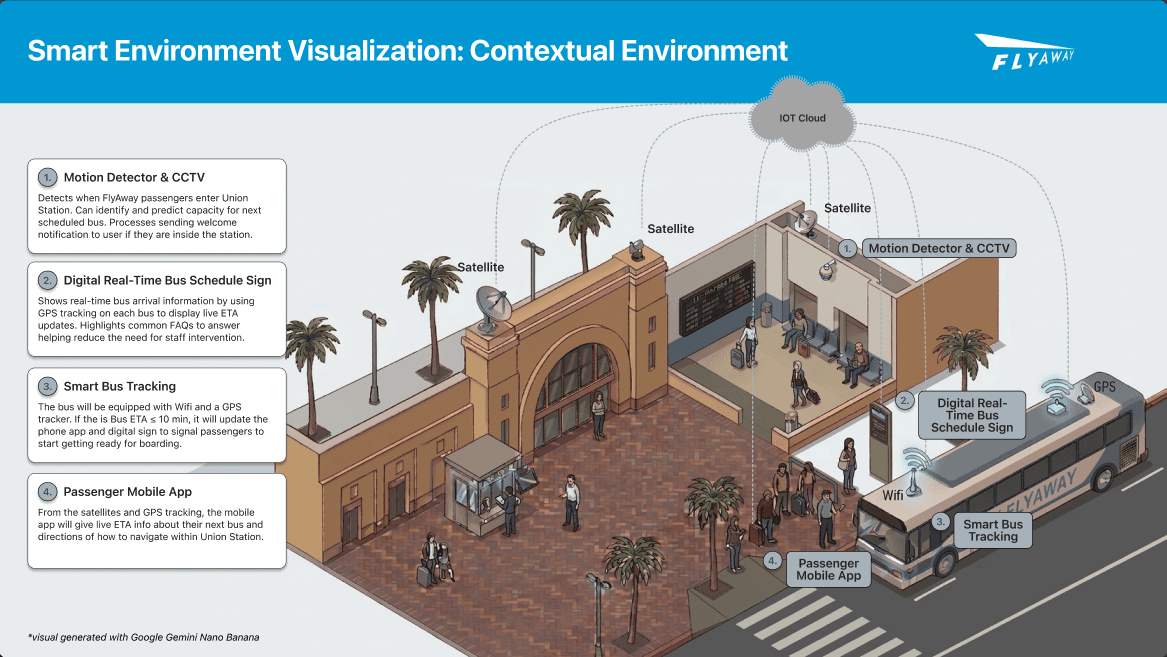
Connected experience
How the pieces connect
The app, station displays, and live bus data work together so the next step shows up wherever travelers are looking.
Research
The service only made sense on the platform.
I went to Union Station to see how the FlyAway actually works: observing travelers, interviewing first-time riders and skycaps, and mapping how the service holds together.
Contextual inquiry
I coded movement, hesitation, luggage handling, and boarding from the live service.
Traveler + worker interviews
First-time riders and skycaps talked through trust, rules, and workarounds on the platform.
Affinity + work models
Physical, sequence, and collaboration models connected what people said to what they did.

Field observation at Union Station
Travelers and skycaps at the FlyAway pickup area.
Findings
Four recurring breakdowns shaped the design.

Hesitation at decision points
Travelers stop at corridor intersections and stairs because FlyAway signs are missing or hard to see.
“I could either go up the stairs or to the side, but there was no sign that led to where the waiting area was.”
— First-time traveler

Following the crowd to navigate
Travelers follow people with luggage instead of reading signs, because the crowd feels more reliable.
“I wasn’t sure if this was the right area until I saw other people with bags.”
— Traveler interview

Copying others to form the line
With no clear line instructions, travelers copy each other, which creates messy queues and worry about doing it wrong.
“Everyone just stood around until someone finally stepped forward.”
— Traveler interview

Workarounds keep the system running
Skycaps don’t have tools for the job, so they build their own systems, like memorizing which bags go to which terminal.
“The official system of paper luggage tagging is too slow… I just remember the terminals and stack the luggage in lanes.”
— Skycap interview
Work models
Modeling the service in motion made the breakdowns clearer.
The physical model showed how space, luggage, and informal groups shaped behavior. The sequence model showed where hesitation piled up across the trip.

Physical model: Union Station FlyAway waiting area

Sequence model: traveler journey from planning to boarding
System-level insight
The system worked because people compensated for what it didn’t communicate.
System ambiguity
Human workaround
Service continues
Physical service concepts
The app can’t be the whole station.
Confirmation shouldn’t live only on a phone. I designed two lo-fi concepts to bring it into the station itself: a shared display in the waiting area and a landmark path on the floor.

Waiting-area sign
Shows arrivals, bay, luggage, and boarding status without opening the app.

Ambient floor path
Leads travelers through corridor decision points using landmarks, so they rely less on workers and crowds.
Design rationale
Each design decision answers a specific moment of uncertainty.

01 Wayfinding
Landmark-based guidance
Directions point to station landmarks at each turn instead of asking travelers to read a generic map.
From research: hesitation at corridor intersections and following crowds.

02 Status
A persistent next step
Trip stage, next step, bus status, and boarding state stay on screen together, so travelers can check at a glance.
From research: repeated questions about where to go, when the bus comes, and when boarding starts.

03 Luggage
Explicit bag confirmation
Terminal and bag handoff status stay visible after travelers hand over their luggage.
From research: lost trust at bag handoff and repeated terminal checks.
Next step
Test whether confirmation changes behavior.
The next step is a field prototype at Union Station, comparing the new experience with the current trip at peak and off-peak times.
Measure 01
Fewer direction and boarding questions to workers.
Measure 02
Less hesitation and backtracking at decision points.
Measure 03
Greater confidence during bag handoff and boarding.
Conclusion
Confirm the next step, right when people need it.
The fix wasn’t more signs or more staff. It was confirming the next step at the moment someone had to act, on their phone and in the station.

Reflection
What I learned
Design the service, not just the screen.
The app could only answer questions for people looking at their phones. Extending confirmation into the station, through signs and floor paths, is what made the concept work for everyone on the platform.